Wardpod
Kubernetes cluster security

Thousands of CVEs. Which should you fix first?

Wardpod matches your images' vulnerabilities with what is really happening in your clusters: known exploitation, exploitation probability, internet exposure and container privileges. You know what to fix first, and where each piece of software runs.

CISA KEV known exploitationsEPSS exploitation probabilityTrivy image analysis

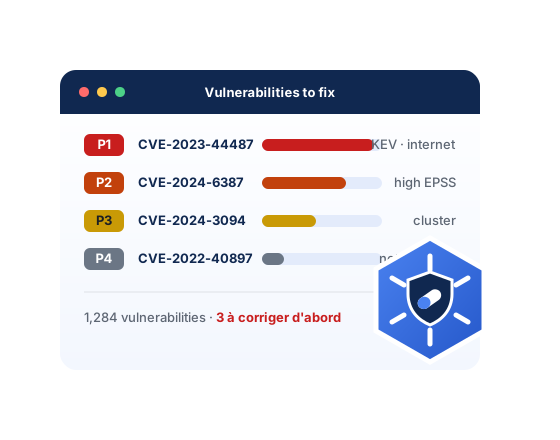
Wardpod console: vulnerabilities ranked from P1 to P4

P1 → P4four priority levels, not a thousand flat CVEs

1 commandto install the agent in a cluster

0 write rightsthe agent only reads, never Secrets

10 imagestracked for free, no credit card

Features

From scanner noise to a short list

A scanner tells you everything that is vulnerable. Wardpod tells you what matters, where it runs.

01 Prioritisation

An exploitability score, not one more severity

Each vulnerability gets a priority from P1 to P4 based on what makes it dangerous for you. An exploited flaw exposed on the internet comes ahead of a hundred others with no known exploit.

  • Confirmed exploitations from the CISA KEV catalogue
  • EPSS exploitation probability, updated daily
  • Score details shown for each vulnerability
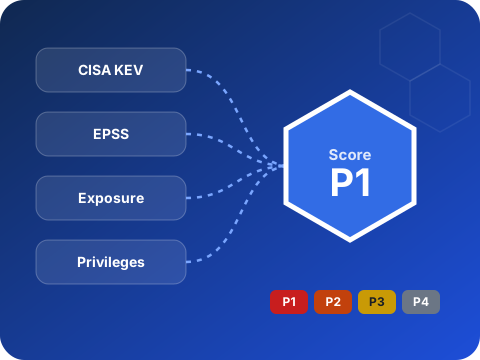
KEV, EPSS, exposure and privileges give a priority from P1 to P4
02 Cluster context

Exposed on the internet, or hidden deep in the cluster?

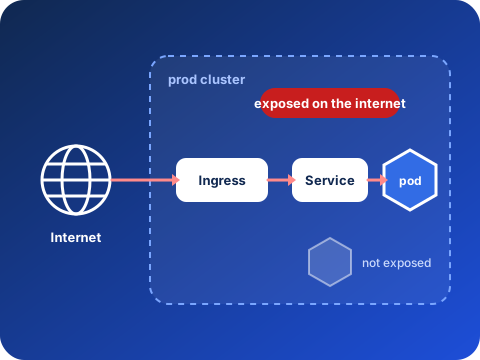
Wardpod follows the real path to your pods and reads their security settings. The same vulnerable package is not equally urgent behind a public Ingress and in an internal batch job.

  • Ingress, Gateway API, Traefik IngressRoute, LoadBalancer, NodePort
  • Internal gateways and load balancers recognised
  • Privileged containers, root, hostPath, dangerous capabilities
Path from the internet to the Ingress, the Service and then the pod
03 Software inventory

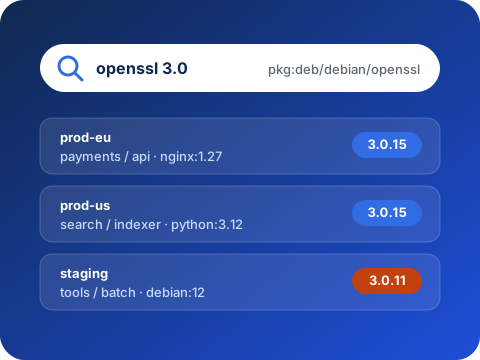
Where does openssl 3.0 run? One search away

When the next major flaw lands, you know within seconds which images, workloads and clusters are affected, from your images' SBOMs.

  • Search by name, version or purl, across all your clusters
  • Packages grouped, versions sorted, licences
  • Includes images with no known vulnerability
Search for openssl 3.0 in three clusters
04 A discreet agent

One command, and nothing else to open

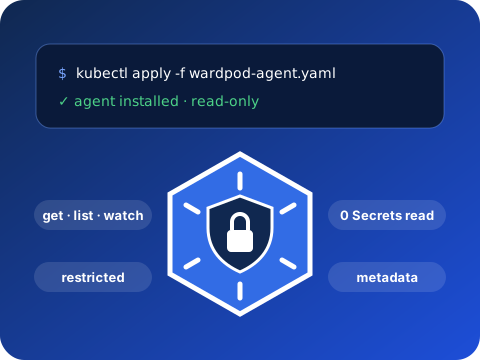
The agent installs with a simple kubectl apply, provided by the console. It uses the Trivy Operator if present, otherwise it analyses the running images itself.

  • Read-only, Pod Security restricted profile
  • No access to the cluster's Secrets
  • Metadata only, never the contents of your images
Agent installed in one command, read-only
05 Tracking and compliance

Evidence, not just dashboards

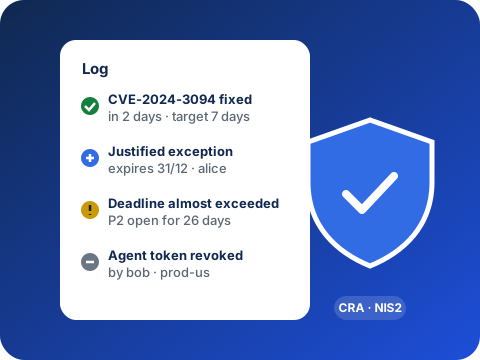
Tracking of fix times, justified and dated exceptions, a log of all actions: what you need to meet the Cyber Resilience Act and NIS2 without a spreadsheet.

  • Exceptions with reason, author and due date
  • Log of each member's actions
  • Accounts protected by two-factor authentication
Log: fixes, exceptions and deadlines
And also

Built for teams running Kubernetes

All your clusters

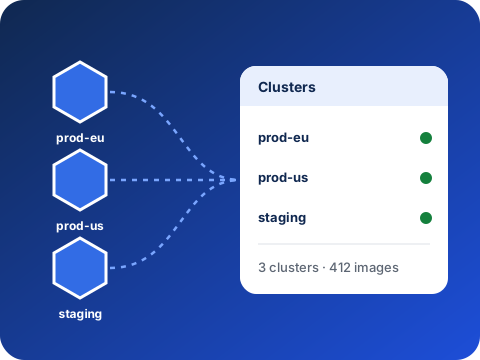
Production, staging, several regions: one console, one agent per cluster.

Fix plan

For each image, the packages to update and the version that fixes them, most urgent first.

Justified exceptions

Accepting a risk is a tracked decision, with a due date, never an oversight.

Organization and roles

Invite your team, administrators and readers, two-factor authentication can be required.

Prometheus metrics

Open vulnerabilities and agent health, ready for your dashboards and alerts.

Your data stays yours

Export of all your data and deletion of the organization at any time.

How it works

Up and running in minutes

No server to install on your side: Wardpod is a service. Only the agent runs in your clusters, and it only reads.

Several clusters reporting to one console

Create your organization

An email address is all it takes. The free plan needs no credit card.

Install the agent

The console gives you a ready kubectl apply command, with the cluster's token.

Fix in the right order

The first results arrive from the first analysis: start with the P1s.

Stop sorting CVEs by hand

Free up to 10 images. No credit card, no commitment.

Create my organization See the demo See pricing